

How to Accept Crypto Payments as a Business: A Practical Guide
A wallet address can receive crypto. A business needs a payment flow that tells your team who paid, what it belongs to, and when it is safe to fulfill.
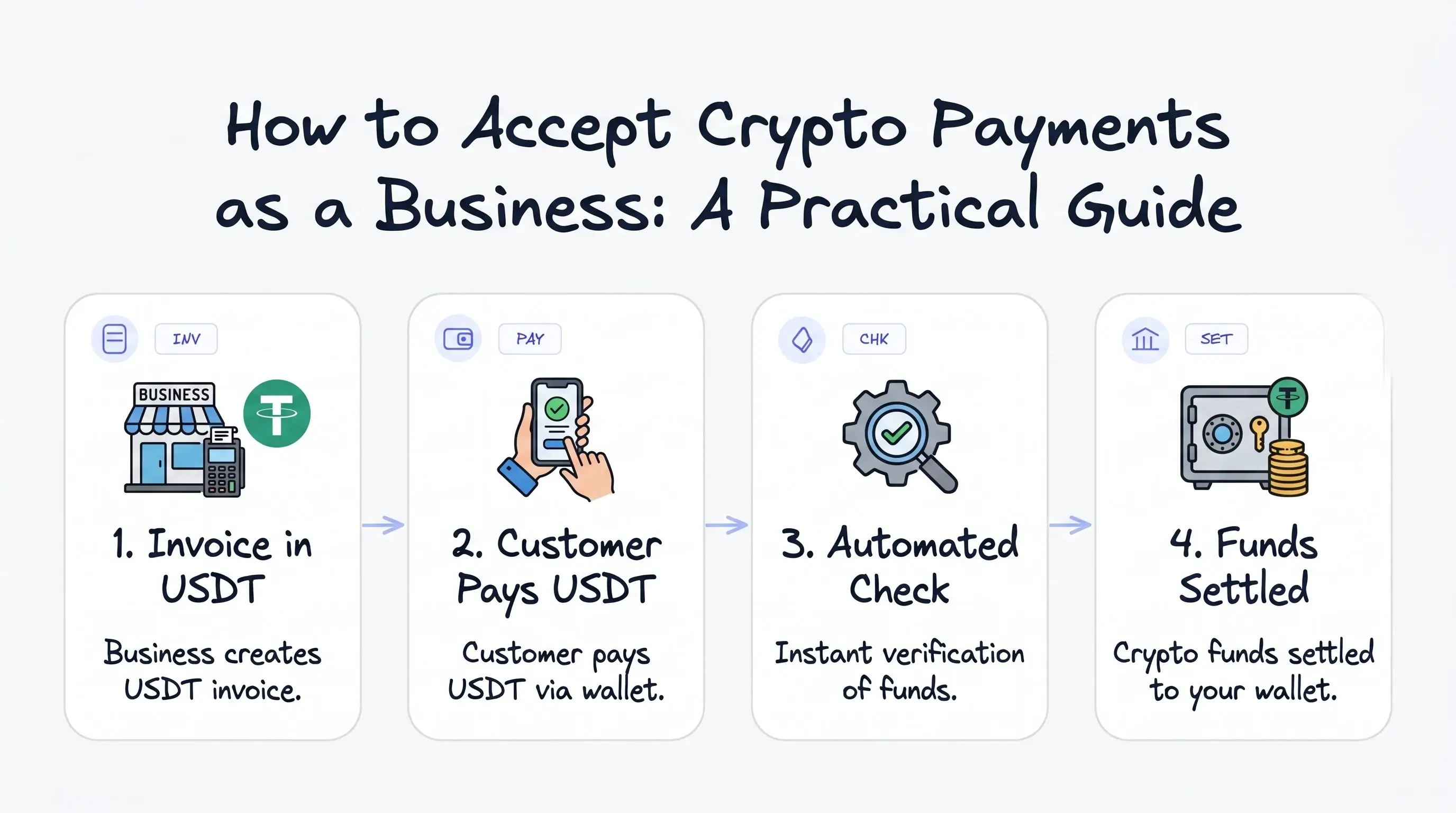

Introduction
A customer sends crypto. The funds arrive. Then your team has to answer the real business questions: who paid, which invoice it belongs to, whether the amount and network are correct, and when the order is safe to fulfill.
That is the difference between receiving crypto and accepting crypto payments as a business.
A wallet address can receive money. A business needs a payment flow. This guide explains the business-ready setup: checkout, invoices, payment links, statuses, confirmations, settlement, fees, risk controls, and API automation.
What to expect in this article
- Crypto payments can be practical for online businesses, especially when customers want stablecoins or global payment options.
- A wallet address is not enough: businesses need checkout, invoices, payment links, payment statuses, settlement tracking, and reconciliation.
- The biggest operational risks are wrong networks, unclear confirmations, underpayments, overpayments, refund handling, fees, and manual wallet checks.
- A crypto payment gateway turns raw wallet transfers into a business workflow your team can track from checkout to settlement.
- Cryptonly is built for that layer: hosted checkout, crypto invoices, payment links, real-time status, wallet settlement, API/webhooks, and AML/KYT-ready monitoring.
Accepting crypto is not the same as posting a wallet address
A wallet address is useful. It is also very limited.
It tells the customer where to send funds, but it does not tell your business what happened next.
A proper payment system should answer questions like:
- Who paid?
- What invoice or order was the payment for?
- Was the payment confirmed?
- Did the customer send the correct amount?
- Was the correct network used?
- Where did the funds settle?
- What fee was applied?
- Does the payment need risk review?
Without those answers, your team is left matching transactions manually.
I think this transfer belongs to invoice #1047 - is not exactly the kind of accounting system investors write songs about.
For a business, the goal is not just to receive crypto. The goal is to run a payment process that customers understand and your team can operate.
Manual wallet payments vs a crypto payment gateway
Here is the practical difference.
| Manual wallet payment | Crypto payment gateway |
|---|---|
| Customer receives a raw wallet address | Customer gets a checkout page, invoice, or payment link |
| Merchant checks wallet activity manually | Payment status is tracked automatically |
| Harder to match payments to orders | Payments are linked to invoices, customers, or order IDs |
| Network mistakes are more likely | The payment page shows asset and network instructions |
| No structured confirmation flow | Confirmations can update payment status |
| Reconciliation is manual | Dashboard, history, and reports support operations |
| No automatic backend updates | APIs and webhooks can automate workflows |
| Risk visibility is limited | AML/KYT-ready monitoring can support review workflows |
A raw wallet transfer can work. A gateway makes it usable for business.
Mini glossary
A few terms matter before we go deeper. You do not need to be crypto-native to understand them.
- Stablecoin: a crypto asset designed to track a traditional currency, usually the US dollar, so payment values are easier to price and reconcile.
- Network: the blockchain rail used to send an asset. USDT on TRON and USDT on Ethereum are the same asset name, but different networks.
- Blockchain confirmation: a signal that a transaction has been included and further settled by the network. Businesses use confirmations before treating some payments as final.
- Wallet settlement: the process of crediting received funds into a merchant balance, wallet, or withdrawal flow.
- KYT: Know Your Transaction, a risk-monitoring process that checks blockchain activity and wallet signals.
- Webhook: an automated message sent to your backend when something changes, such as a payment becoming confirmed or expired.
Why businesses accept crypto payments
Most businesses do not add crypto payments because they want to sound futuristic. They do it because some customers already hold crypto or stablecoins, especially in international payment flows where cards or bank transfers can be slower or less convenient.
Stablecoins make this more practical for merchants because they are designed to track traditional currencies, usually the US dollar. If a business accepts more volatile assets, it needs clear pricing rules: when the rate is locked, how long the customer has to pay, and what happens if the market moves before confirmation.
For invoices, digital products, SaaS, marketplaces, and online platforms, crypto payments work best when they connect to checkout, status tracking, settlement, reporting, and API automation. Sending a wallet address in a chat may work once. Running a business that way gets messy fast.
What a business crypto payment flow should include
A good crypto payment flow usually has several parts. Not all businesses need every feature on day one, but the foundation should be there.

1. A checkout page, invoice, or payment link
The customer needs one clear place to pay: a hosted checkout page, crypto invoice, payment link, or API-generated payment page. The business consequence is simple: the customer should not have to guess what to send, where to send it, or how long they have to complete the payment.
2. Clear asset and network selection
Crypto has one detail that confuses many first-time payment users: the asset and the network are not always the same thing. A customer may choose USDT, but USDT can exist on TRON, Ethereum, BNB Smart Chain, and other networks.
A business-ready payment page should show the asset, network, exact amount, wallet address or QR code, expiration time, and payment status. The goal is to prevent support tickets before they happen.
I sent the right coin… maybe not on the right chain. - That sentence should not be your support workflow.
3. Payment status tracking
A customer saying "I sent it" is not a payment status. A business needs statuses.
Useful statuses include:
- Created - the payment request exists.
- Pending - the transaction was detected but is not fully confirmed.
- Confirmed - the transaction reached the required confirmation state.
- Expired - the customer did not complete the payment in time.
- Underpaid - the customer sent less than required.
- Overpaid - the customer sent more than required.
- Failed - the payment could not be completed.
These statuses decide what your business does next: fulfill the order, mark the invoice as paid, unlock access, contact support, or send the transaction to review.
Without statuses, every crypto payment becomes a conversation. Conversations are nice. Order fulfillment should not depend on them.
4. Blockchain confirmations
A transaction can appear on-chain before your business should treat it as final. Blockchain confirmations help reduce uncertainty, and the number required can depend on the asset, network, amount, and risk policy.
This matters for digital products, account access, and automated fulfillment. Mark a payment complete too early and you create risk; wait too long and the customer experience suffers.
5. Settlement visibility
Once the customer pays, the merchant still needs to know where the funds go. Settlement is the process of crediting or moving received value into a merchant balance, wallet, or payout path.
A personal wallet can show that funds arrived. A merchant dashboard should show what was paid, what fees applied, which balance changed, whether funds are available, and how the transaction should be reconciled.
6. Fees and withdrawal logic
Crypto payments can involve gateway or deposit fees, blockchain network fees, withdrawal fees, and possible conversion or settlement costs depending on the provider.
A merchant should not have to reverse-engineer fee logic from transaction history. A good setup shows who pays what: the customer pays the invoice amount, the merchant sees the deposit fee, the dashboard shows the credited amount, and withdrawal screens show the applicable network fee.
Payment fees are not exciting. But unclear payment fees are very exciting - in the bad way.
7. AML/KYT-ready risk controls
Crypto payments move quickly, but businesses still need risk visibility. AML stands for Anti-Money Laundering. KYT means Know Your Transaction, usually referring to monitoring blockchain activity and wallet risk signals.
For businesses, AML/KYT-ready checks can help identify suspicious wallets, risky transaction patterns, or payments that need review. This does not mean every customer should feel like they are passing through airport security to buy a subscription.
The best setup keeps checkout simple while giving the merchant useful checks in the background. Crypto payments should move fast. They should not move blind.
8. API and webhooks for automation
A small business may start with hosted checkout, invoices, or payment links. A technical team may eventually need payment data inside its own product. That is where APIs and webhooks matter.
An API lets your system create payments, invoices, or checkout sessions programmatically. A webhook tells your backend when something changes: payment created, pending, confirmed, expired, settled, or withdrawn.
Without webhooks, someone has to manually check payment status and update internal systems. That person will eventually develop strong opinions about automation.
How to start accepting crypto payments
Here is a practical implementation path.
Step 1: Decide what kind of payments you need
Start with the business use case. Are you accepting payments for:
- ecommerce orders;
- digital products;
- SaaS subscriptions;
- freelance or agency work;
- B2B invoices;
- platform transactions;
- marketplace flows?
Your use case determines whether you need checkout, invoices, payment links, API integration, or all of them.
Step 2: Choose assets and networks
Do not start with every possible asset unless you have a reason. Many businesses start with stablecoins because they are easier to price and reconcile. Then decide which networks make sense for your customers and operations.
Step 3: Set up checkout or invoices
For fast launch, hosted checkout and invoices are usually the easiest starting point. A hosted page can handle customer-facing payment instructions, while your dashboard tracks status and settlement.
Step 4: Define confirmation rules
Decide when a payment should be treated as confirmed. This may depend on the network, asset, amount, and business risk policy.
Step 5: Connect operations
Make sure your team can see payment status, transaction history, balances, fees, settlement records, and withdrawals. If your team needs automation, connect API and webhooks.
Step 6: Add risk visibility
If your business needs compliance controls, make sure AML/KYT-ready monitoring is part of the flow. This is especially important for higher-risk categories, larger transaction volumes, or businesses with stricter operational requirements.
Step 7: Test before going live
Run test scenarios:
- exact payment;
- underpayment;
- overpayment;
- expired payment;
- delayed confirmation;
- wrong network support process;
- webhook delivery;
- settlement and withdrawal records.
Crypto payment flows are much easier to fix before customers are involved. Customers are not QA testers. They are customers.
Practical merchant scenarios
The details change by business model, but the operational pattern is usually the same: the customer needs clear instructions, and the merchant needs a reliable record.
- Ecommerce: keep the order pending until the payment is detected, confirmed, and matched to the right cart or order ID.
- SaaS: unlock access only after the payment reaches the required status, with webhooks updating the product automatically.
- B2B invoices: send a crypto invoice instead of a raw wallet address so the client gets clear instructions and finance gets a record for reconciliation.
Same idea, different businesses: crypto payments become useful when they connect customer payment behavior to order, access, invoice, settlement, and reporting data.
Common mistakes businesses make
Mistake 1: Treating a wallet address as checkout
A wallet address is a destination. Checkout is a customer experience. Businesses need the second one.
Mistake 2: Ignoring network instructions
"Send USDT" is not enough if multiple networks are possible. Be specific.
Mistake 3: Not tracking confirmations
On-chain does not always mean ready for fulfillment.
Mistake 4: Forgetting reconciliation
If payments cannot be matched to invoices, orders, refunds, or exceptions, your finance team ends up doing manual puzzle-solving. That is rarely a good use of expensive humans.
Mistake 5: Adding automation too late
Even if you start manually, think about how payment data will eventually connect to your product, accounting, support, or backend systems.
What to look for in a crypto payment gateway
When choosing a crypto payment gateway, look for operational clarity, not just a long list of supported coins. Useful features include:
- hosted checkout;
- payment links;
- crypto invoices;
- stablecoin support;
- asset and network selection;
- real-time payment status;
- blockchain confirmation tracking;
- merchant dashboard;
- transaction history;
- balance management;
- fee visibility;
- wallet settlement;
- withdrawals;
- refund and exception handling;
- API and webhooks;
- AML/KYT-ready monitoring;
- branded checkout experience.
The best gateway is the one that makes crypto payments feel less like manual wallet work and more like a real payment system.
Where Cryptonly fits
This is where Cryptonly fits: it gives businesses the layer between a blockchain transfer and a usable payment operation.
Instead of asking merchants to manage raw wallet activity, Cryptonly helps organize the parts that businesses actually need:
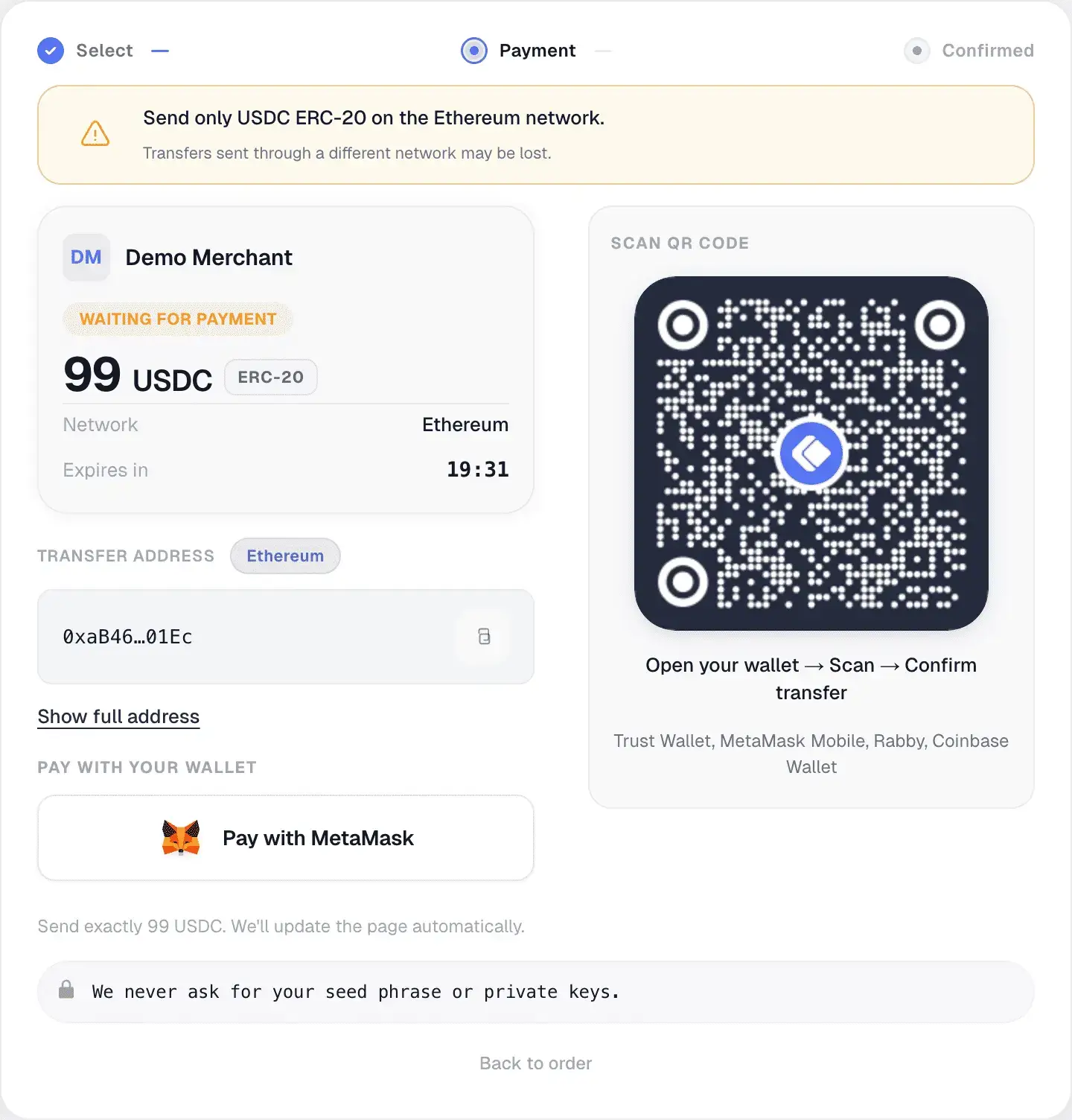
- hosted checkout, crypto invoices, and payment links for clear customer payment instructions;
- real-time payment statuses for created, pending, confirmed, expired, underpaid, and overpaid payments;
- merchant balances, fees, wallet settlement, withdrawals, and transaction history in one dashboard;
- API and webhooks when payment events need to connect to a product or backend;
- AML/KYT-ready monitoring to support risk visibility where the business needs it.
The point is not to make every merchant become a blockchain operations team. The point is to make crypto payments behave like a payment process your team can understand, track, and reconcile.
FAQ
Can a business accept crypto without building a custom integration?
Yes. Hosted checkout pages, invoices, and payment links can let a business start accepting crypto without building a custom payment interface. API integration can be added later for deeper automation.
Should businesses accept stablecoins first?
For many merchants, stablecoins are the most practical starting point because their value is easier to understand and reconcile. The right choice depends on your customers and business model.
How fast are crypto payments confirmed?
It depends on the asset, network, confirmation requirements, and network conditions. Some networks are faster than others, but businesses should rely on payment status tracking rather than assumptions.
What happens if a customer sends the wrong amount?
A payment gateway should detect cases like underpayment or overpayment and provide a clear status or support workflow.
Final takeaway
To accept crypto payments as a business, you need more than a wallet address. You need a process that connects checkout, customer instructions, payment status, settlement, fees, risk checks, and reconciliation.
Crypto payments can be fast, global, and practical. They work best when they are treated like payment operations, not a manual wallet-watching exercise.
Cryptonly helps businesses accept crypto and stablecoin payments through hosted checkout, crypto invoices, payment links, and API integrations - with payment status, fees, wallet settlement, balances, and withdrawals tracked from one merchant dashboard.
Related articles
- Comparing Crypto Payment Gateways in 2026: How to Choose YoursThere is no "best" crypto gateway — only the one that fits your business. We compared five gateways on fees, KYB friction, and withdrawal terms so you can choose based on your priorities.
 Launching A SaaS Product In 2026 Without Burning Out: A Practical Guide From First Idea To Global ScaleA practical guide from product-market fit through go-to-market, billing, and global payment infrastructure — including how crypto acquiring and stablecoins simplify worldwide monetization for early-stage SaaS.